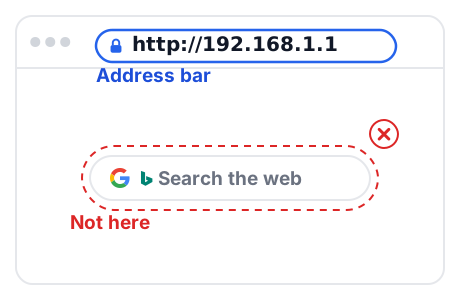
192.168.1.1 sits inside the block that RFC 1918 reserves for private networks, so it only answers devices on the same local network. TP-Link, NETGEAR, Linksys and ASUS all document it for some of their routers, but no standard makes it your router's address. Check the Default Gateway your own device reports before you type it into a browser.
What 192.168.1.1 Is, and What It Is Not
RFC 1918 reserves 192.168.0.0 - 192.168.255.255, a /16 prefix, for private internets. The IANA registry lists that block as Private-Use, allocated in 1996 under RFC 1918, and it is not globally reachable. In practice, nobody can open your router page from the internet.
What the standards do not do is name 192.168.1.1 as the router address. Private space is numbered locally, so each manufacturer picks its own default.
- TP-Link lists
192.168.0.1or192.168.1.1for routers. - TP-Link lists
192.168.1.1for DSL and cable modem routers. - NETGEAR tells users to try
192.168.1.1or192.168.0.1. - Linksys documents
192.168.1.1for its Smart Wi-Fi routers. - ASUS documents
192.168.1.1or192.168.50.1.
Each of those is a documented possibility, not a promise about your device.
Which Routers Document 192.168.1.1
These are the manufacturers' own words, read from their documentation on 2026-10-12.
- TP-Link: "Router: 192.168.0.1 or 192.168.1.1" and "DSL and Cable Modem and Router: 192.168.1.1" (TP-Link FAQ 1170).
- NETGEAR: "First, try 192.168.1.1 or 192.168.0.1" for WiFi 5, WiFi 6, WiFi 6E, WiFi 7 and gaming routers (NETGEAR KB 27199).
- Linksys: "The default IP address of the router is 192.168.1.1" for Smart Wi-Fi, and the MR5500 article documents the same address (Linksys KB 268, KB 250).
- ASUS: "For ASUS routers, the default LAN IP is 192.168.1.1 or 192.168.50.1" (ASUS FAQ 1011245).
A router that is not on this list can still use the address, but then it is your network's own choice rather than a documented default. Confirm it on the device before you sign in.
Find the Gateway Your Device Actually Uses
The Default Gateway value is the address your device is really talking to. Read it first, and continue only if it matches 192.168.1.1.
- Windows: open Command Prompt, type
ipconfig, press Enter, and read the entry next to Default gateway for your Wi-Fi or Ethernet adapter (Microsoft Support). - macOS: open System Settings, go to Wi-Fi, and click Details for your network. Apple documents the Router row there as the router address for the Wi-Fi connection (Apple Support).
On another platform, read the same value wherever your device lists the network's router or gateway address.
Log In With the Documented Defaults
Credentials belong to the router model, not to the address. Consult the interactive router brands table above for your model's specific combination.
- TP-Link: older models use admin as both the default username and password. Newer models require you to create a custom admin password on first login (TP-Link FAQ 87).
- NETGEAR: the login guide gives the username as usually admin and the password as usually password, and says to look on the bottom of the unit for your device's combination (NETGEAR).
- Linksys: admin is the default router password, and no default username is documented. The MR5500 article gives admin as the default administrator password of an unconfigured router (Linksys KB 250).
- ASUS: the RT-N13U documentation lists admin/admin. Current ASUS guidance says a router at first login or after a factory reset asks you to set the login account and password first (ASUS FAQ 109928, FAQ 1005263).
One rule applies to every brand: default credentials vary by product and are printed on a label on the back or bottom of the device or in the Quick Installation Guide (TP-Link FAQ 776). If a documented default is rejected, read the label instead of trying more passwords.
Excluded Candidates and Disqualified Assumptions
Verification against official manufacturer documentation disqualified several common assumptions:
- TP-Link TL-WR841N: Excluded. The official v14 User Guide and support records confirm factory default address
192.168.0.1(andtplinkwifi.net), not 192.168.1.1. - Zyxel NBG6615: Excluded. Official documentation specifies
192.168.212.1in router mode. - OpenWrt: Excluded from hardware router lists. OpenWrt uses 192.168.1.1 with username root and no initial password, but it is an open-source firmware distribution rather than a router model.
- Brand-wide uniformity: Neither NETGEAR, TP-Link, nor D-Link standardizes on a single IP across all models. Always check the specific model and revision before assuming 192.168.1.1.
If 192.168.1.1 Does Not Open
Work through these in order. Each one is documented by a manufacturer or a platform vendor, not guessed.
- You are not on that router's network. The address is in private space and is not reachable from outside, so a phone on mobile data cannot open the page.
- Your gateway is a different address. Read the Default Gateway value again and open that address instead (Microsoft Support; Apple Support).
- The router moved its own LAN IP. Linksys documents this for the MR5500: "If the upstream device uses the same IP address, the router will automatically use a different LAN IP address to avoid any conflict" (Linksys KB 250).
- The device came from a carrier. Huawei states that the address may vary for carrier custom versions and points users to the nameplate or to the carrier (Huawei support).
- The page opens but the login fails. Use the documented credentials in the table above, and the device label when a documented default is rejected.
This page does not publish reset sequences. Reset behaviour is specific to each model, so it belongs in your router maker's own documentation, where it is bound to your exact device.
Related Help on This Site
- How to find your router's IP address on any device: the general procedure behind the checks above.
- Router login pages by brand: brand-level login guides.
- 192.168.1.254: the address that provider gateways such as BT Hubs and AT&T gateways document instead.
- How to find your router's IP address: what to check when the router page will not open.
- Forgot your router password: what to check before you consider a reset.
Official Sources & Standards
- RFC 1918: Address Allocation for Private Internets (IETF)
- TP-Link FAQ 1170: default IP addresses by product type
- NETGEAR KB 27199: I can't access my router
- Linksys KB 268: access the router settings
- ASUS FAQ 1011245: ASUS router default LAN IP
- Microsoft Support: find the Default gateway of your network
- Apple Support: Wi-Fi settings on Mac