Why 192.168.0.1 Is Not Always Your Gateway
192.168.0.1 is a private local address, but it is not a universal router login address. It belongs to the 192.168.0.0/16 private IPv4 range defined by IETF RFC 1918. Private addresses are not globally unique and are not routed on the public internet; devices communicate across local subnets and reach the internet through Network Address Translation (NAT).
RFC 1918 does not assign 192.168.0.1 to a router brand, model, or web interface. A router manufacturer may use it as a factory default, an internet provider may use another address, and a network owner can change the local address during setup. The address that matters is the active gateway reported by the device currently connected to your network.
Device IP, Default Gateway, and Public IP
- Device IP address: Address assigned to your phone, tablet, or computer on the local network, such as
192.168.0.23. It identifies your device, not the router. - Default gateway: Local address your device uses to reach networks outside its current subnet. On many home networks, this is the router address to try in a browser.
- Public IP address: Address your internet provider exposes to websites and other services on the internet. It is not normally the address used to open local router settings.
A default gateway may belong to a router, an internet-provider gateway, a modem-router combination, or another network device. It may not always expose a browser-based administration page.
Check Whether 192.168.0.1 Is Your Active Gateway
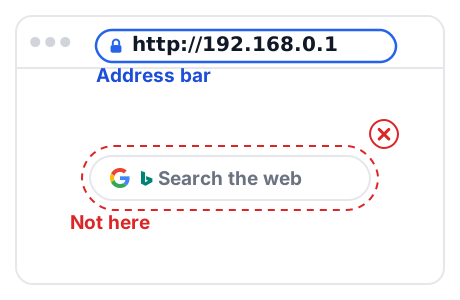
Check the gateway value shown by your connected device before assuming that 192.168.0.1 is correct. You can find your gateway quickly without third-party software:
- Windows: Open Command Prompt, run
ipconfig, and find Default Gateway. - macOS: Open System Settings → Network → Wi-Fi → Details → TCP/IP, and find Router.
- iPhone / iPad: Open Settings → Wi-Fi, tap the information button (i) beside your connected network, and find Router.
- Android: Open Settings → Connections (or Network & internet) → select your connected Wi-Fi (gear icon) → View more / Advanced → find Gateway. Menus vary across Android versions and manufacturers, including Samsung One UI.
- Linux: Open a terminal, run
ip route show default, and find the gateway address followingvia.
Note: 192.168.1.1 is another common gateway address in the same RFC 1918 range. If your device reports 192.168.1.1, see our 192.168.1.1 router login guide.
Find your router IP address on Windows, Mac, iPhone, Android, and Linux →
When 192.168.0.1 May Not Open a Router Login Page
A login page that does not load does not mean your router is broken. First confirm that you are connected to your router's main Wi-Fi or local Ethernet and check the Default Gateway reported by your device. If the gateway is not 192.168.0.1, open the address your device reports instead.
If the gateway is 192.168.0.1 and the page still will not open, check each of these causes:
- The router's local address was changed during setup. The default address only applies until someone changes it.
- Your router is managed with a phone app. Some routers use an app instead of a browser login page.
- Another device sits between you and the router. A modem in bridge mode, a mesh system, or a range extender can behave differently from a standalone router.
- You are on a guest or public network. Guest networks may use AP isolation, which blocks access to the router's admin page. Connect to your primary home Wi-Fi or a local Ethernet cable, then try again.
If a listed default password does not work, it may have been changed. Before you consider a factory reset, read how to recover a forgotten router password. A factory reset erases your settings, including your Wi-Fi name and password.
Sources and Verification
- IETF RFC 1918: Address Allocation for Private Internets: Defines private IPv4 ranges, including
192.168.0.0/16. - Manufacturer documentation and official support portals: TP-Link FAQ 87, D-Link Support, NETGEAR Knowledge Base, Virgin Media Broadband Help, and Sky Router Help.
- Last reviewed: October 2026. Router models and firmware revisions may vary by region.